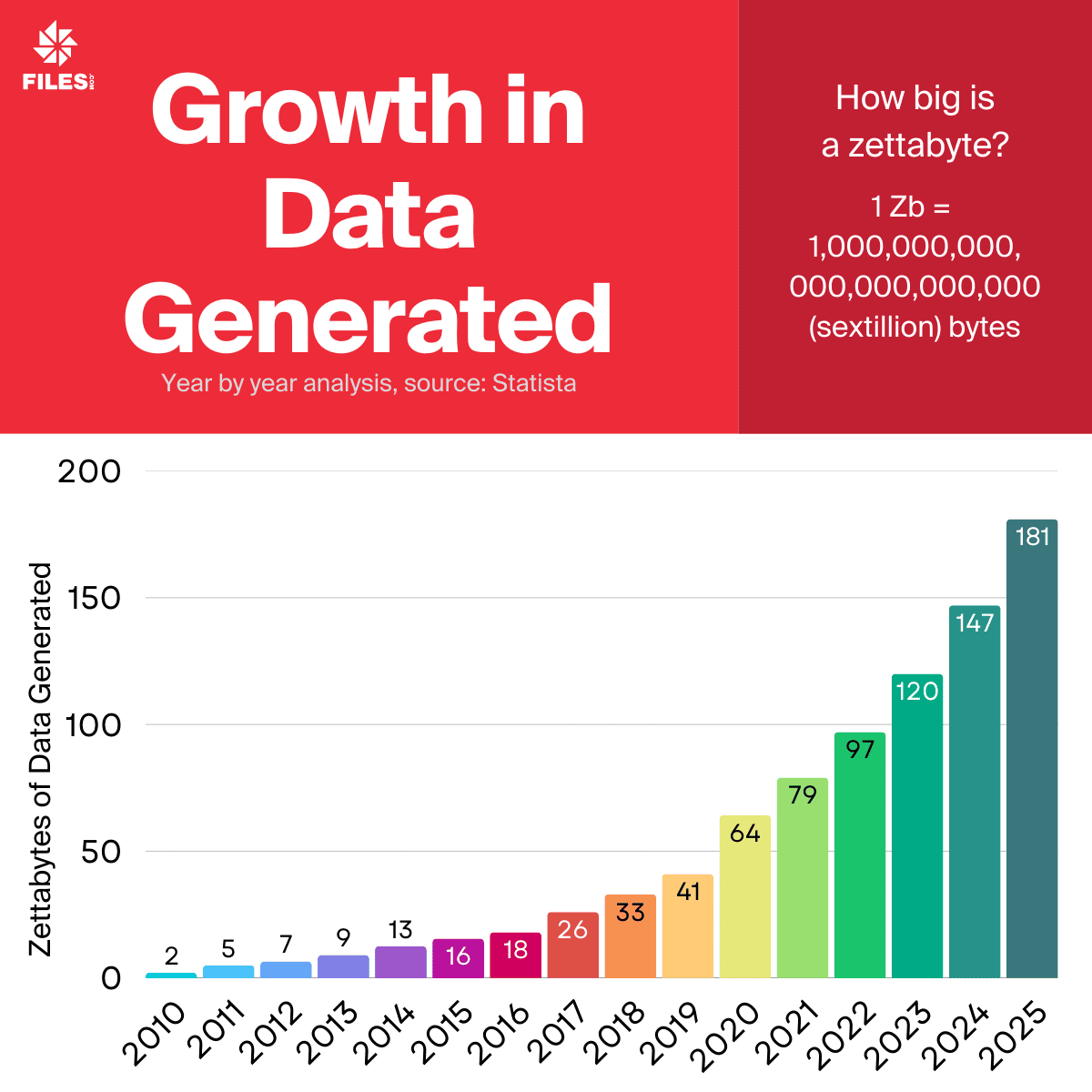
The amount of data in the world is growing fast. By IDC's count, the total went from about 2 zettabytes in 2010 to a projected 181 zettabytes in 2025. A zettabyte is a trillion gigabytes, so this is a roughly ninety-fold jump in fifteen years. The headline number matters less than what it does to the people who have to move that data around: more transfers running at once, more partners sending and receiving files, more data feeds running in parallel, more records to keep for audits, and more retention rules to enforce. A file management setup that was the right size in 2015 is not the right size for this.
Most of that growth comes from things already running in your stack. Cloud applications write logs and exports around the clock. AI training pipelines pull in data by the terabyte. Teams in every timezone produce files all day. And systems hand files to other systems with no person in the loop. Every one of those files still has to be stored, secured, moved, and tracked. The rate at which new files show up has outrun the rate at which older file infrastructure can keep up.
Why The Volume Breaks Older File Systems
Older file systems were not designed for this pace or this scale. The classic enterprise pattern — a few FTP servers (File Transfer Protocol, the decades-old standard for moving files between machines), some manual hand-offs, and a handful of loosely governed cloud shares — was built for a steady trickle of files, not a flood.
When the volume climbs, the cracks show up in predictable places. A server that handled fifty transfers a night starts choking at five hundred. A manual upload that someone remembered to do every Friday gets missed the week things are busy. A cloud share that nobody set permissions on becomes the thing the auditor flags. At low volume those are annoyances. At high volume, every one of them is a real risk to uptime, to passing an audit, and to the trust of the partner on the other end of the transfer.
What File Management Looks Like at Scale
Handling a much larger volume of files well comes down to a few capabilities that are easy to name and harder to bolt on after the fact:
- Capacity that grows with the data. The system should absorb more files and more concurrent transfers without someone provisioning a new server every time a partner comes online.
- One place that speaks every protocol. Partners connect over SFTP, FTPS, HTTPS, or a REST API (a standard web interface other programs can call), and you manage all of it from a single platform instead of one tool per protocol.
- Automation that removes the manual step. A file arriving should be able to kick off the next job — a transfer, a transform, a notification — on its own, so nobody has to remember to click. This is the difference between workflow automation and a calendar reminder.
- A complete record of every action. Every upload, download, and login lands in an audit log — the searchable history an auditor asks to see — so compliance is a query, not a scramble.
- Reliable, fast transfers. Files move quickly and predictably even when the volume spikes, with fast uploads and downloads that hold up under load.
None of these is exotic. They are the baseline for moving files at scale without adding headcount every time the data grows.
Where The Volume Is Headed
The 181-zettabyte figure for 2025 is not a ceiling. AI-generated content, higher-resolution media, and more connected devices keep pushing the total up. The size of the data is only half of it, though. The harder half is the speed, the automation, the traceability, and the flexibility it takes to manage that data without the management effort growing just as fast. The goal is to add files without adding manual work.
Managing Files on a Single Platform
Most teams that outgrow a pile of FTP servers and manual hand-offs move to a single File Orchestration Platform — one place that does the whole job of moving files, instead of a stack of separate tools held together by scripts. Files.com is the cloud-native version of that. It speaks every protocol your partners use, connects 50+ cloud and on-prem systems, automates every transfer, and keeps a complete audit trail. As the volume climbs, you are adding files to a platform built to absorb them, not adding servers you have to patch and babysit. For more on what that consolidation looks like, see file orchestration for enterprises.
If you want to see how a single platform handles the protocols, the automation, and the audit trail at scale, explore Files.com's workflow automation or start a free trial — no credit card, live in minutes.