B2B file transfer is the daily plumbing between your company and the partners, vendors, banks, and customers you exchange files with. B2B is short for business-to-business: the file is going to another company, not to a person inside your own. An ACH file to the bank at 4pm. A daily sales extract to a customer's data team. An EDI 850 purchase order from a buyer. A claim file to a healthcare clearinghouse. Each one is a standing agreement — what gets sent, when, in what format, how the other side confirms receipt, and where the record lives if something goes wrong at 2am.
Email attachments and a shared FTP server cover the easy cases and break on every hard one. B2B file transfer solutions exist because moving a file to another company reliably, every day, with proof it happened, is a different problem from emailing a spreadsheet to a coworker. This post explains what these file transfer solutions actually do, the terms you will run into, and how the pieces fit together.
What Is B2B File Transfer?
B2B file transfer is the exchange of files between two or more businesses in a way that is secure, scheduled, and recorded. The word "secure" means the file is scrambled so nobody can read it in transit (encryption) and only the right party can pick it up (authentication). "Scheduled" means the transfer happens on a clock or a trigger, not because someone remembered to do it. "Recorded" means there is a log that proves the file was sent, received, and by whom.
That last part is what separates a B2B file transfer solution from emailing an attachment or dropping a file on a USB drive. When you send a payroll file to your bank, you need to prove later that it left your system at a specific time and arrived intact. Email cannot prove that. A purpose-built file transfer solution can.
The Terms You Will Run Into
A few acronyms come up constantly in B2B file transfer. Here is each one in plain language.
MFT — Managed File Transfer. MFT is the category name for software that moves files between companies and manages the whole job: who can connect, how the file is encrypted, when it runs, what happens if it fails, and what gets logged. "Managed" is the operative word — a plain FTP server moves files, but you babysit it. An MFT platform handles the scheduling, retries, alerting, and audit trail for you. If a transfer fails at 3am, MFT retries it and tells someone; a bare FTP server just leaves a half-finished file sitting there.
EDI — Electronic Data Interchange. EDI is a standard format for business documents — purchase orders, invoices, shipping notices — so that two companies' computers can read each other's paperwork without a human retyping it. An "EDI 850" is a purchase order; an "EDI 810" is an invoice. The numbers are just document types in the standard. EDI defines what the document says; it does not, by itself, move the file. That is where the next term comes in. (For more on how this data moves, see understanding electronic data transfer.)
AS2 — Applicability Statement 2. AS2 is a secure way to send those EDI documents over the internet. It wraps the file in encryption, adds a digital signature so the receiver knows it really came from you, and sends back a signed receipt called an MDN that proves delivery. Big retailers and their suppliers run on AS2 because the signed receipt settles the "did you send it / did we get it" argument before it starts. If you trade with a large retailer, odds are they will hand you an AS2 and EDI requirement on day one.
SFTP and FTPS. These are the two common secure ways to move a raw file between servers. Plain FTP sends everything, including your password, in readable text — fine in 1985, a liability today. SFTP and FTPS both add encryption on top so the file and the login cannot be read in transit. Most partners that do not require AS2 will ask for SFTP.
You do not have to pick one of these and stick with it. A real partner network uses several at once: AS2 with the retailer, SFTP with the bank, a scheduled EDI batch with the manufacturer.
How B2B File Transfer Works
Strip away the acronyms and every B2B transfer runs through the same five steps:
- Authentication. Each side proves who it is — usually with a username and an SSH key or certificate, not just a password.
- Encryption. The file is scrambled before it leaves your network so it cannot be read if intercepted.
- Transfer. The file moves to the partner over the agreed protocol — AS2, SFTP, or FTPS.
- Validation. The receiver checks the file arrived whole and unaltered, and (with AS2) sends back a signed receipt.
- Logging. Every step is written to an audit log — who connected, what moved, when, and whether it succeeded.
The first four steps move the file. The fifth is the one teams forget until an auditor or an angry partner asks "can you prove you sent the file on the 14th?" A B2B file transfer solution treats that log as a first-class feature, not an afterthought.
What a Real Solution Handles That Email and FTP Do Not
A spreadsheet emailed to a coworker is forgiving. A daily file going to a bank or a Fortune 500 buyer is not — and that is where the gaps in email and a bare FTP server start to cost money.
- Per-partner rules. Each partner wants a different protocol, folder, file naming convention, and schedule. A solution lets you set those rules per partner; email and shared FTP make you handle them by hand. Partner onboarding is the part of the job that turns a new trading agreement into a working, repeatable transfer.
- Automation and retries. Recurring jobs — the nightly extract, the 4pm ACH file — run on a schedule with automated workflows, and a failed transfer retries on its own instead of silently not happening.
- Encryption everywhere. Files are encrypted both in transit and at rest, using strong standards like AES-256, so a stolen disk or an intercepted connection does not leak the data.
- A complete audit trail. Every login and transfer is logged, which is what passing a SOC 2, HIPAA, or GDPR audit actually requires. Without it, compliance verification turns into a scramble.
- Scale without new servers. Adding a partner is a configuration change, not a hardware project. A bare FTP setup usually means standing up and hand-managing another box.
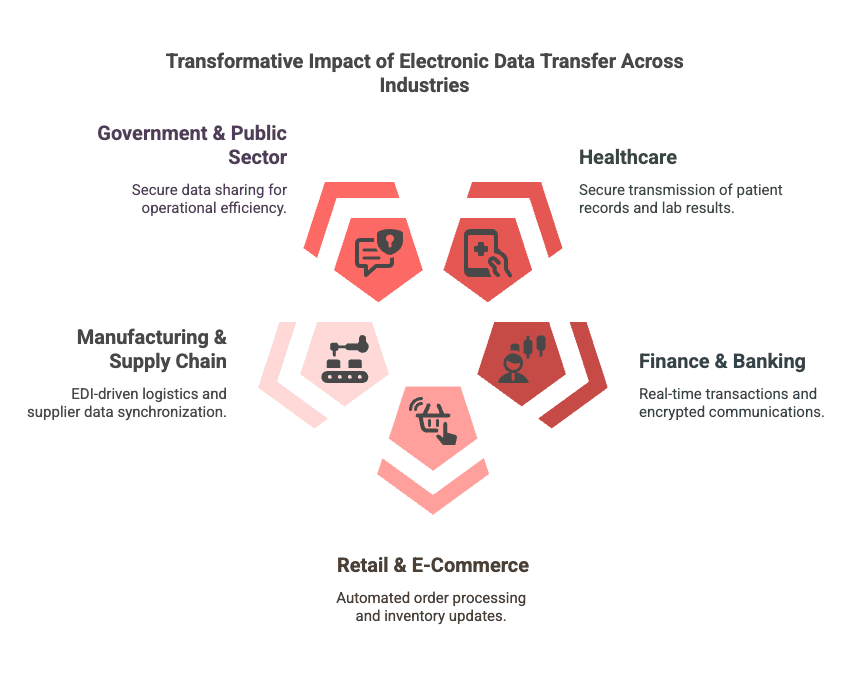
Where B2B File Transfer Shows Up
The pattern repeats across industries, with the same shape and different documents:
- Healthcare. Hospitals exchange patient records and claim files with partner clinics and clearinghouses, under HIPAA rules that demand a full audit trail.
- Finance. Banks and their corporate customers move ACH files, statements, and reconciliation extracts on a fixed daily clock, with regulators expecting proof of every transfer.
- Manufacturing and retail. Suppliers send EDI purchase orders, invoices, and advance shipping notices to buyers — most often over AS2 — to keep the supply chain in sync.
In every case the file matters less than the discipline around it: the right partner gets the right file, on time, encrypted, with a record that it happened.
Running B2B File Transfer on a Modern Platform
Most teams start with a shared FTP server and a few scripts, add a partner, add another, and wake up one day maintaining a fragile web of cron jobs, one-off boxes, and tribal knowledge about which partner needs which folder. The fix that has held up is consolidation: move the whole job onto one platform instead of stitching tools together.
Files.com is the cloud-native File Orchestration Platform — one platform that replaces the stack of legacy tools IT teams run to move files between companies: SFTP and FTP servers, MFT suites, AS2 and EDI gateways, and the custom scripts holding them together. It speaks every protocol your partners use — AS2, SFTP, FTPS, FTP, and an S3-compatible API — connects to 50+ cloud and on-prem systems, automates every recurring transfer, and keeps a complete audit trail of who sent what and when. Your partners keep their existing clients and logins; there is no server for you to run or patch. Files.com runs the AS2 trading relationships, the SFTP and FTPS endpoints, and the EDI workflows from the same place, so onboarding a new partner is a configuration step rather than a new integration project — and every transfer is logged for SOC 2 Type II and HIPAA audits without extra work.
For more on what tends to go wrong before teams make that move, the hidden risks in B2B file exchange are worth reading.
To see it in practice, explore Files.com's managed file transfer or start a free trial — no credit card, live in minutes.